The BOMBANANA demo free download has become one of the most talked-about co-op experiences on Steam this summer, and for good reason: it packs the full chaotic bomb-defusal loop into a completely free package. Since the demo launched on June 15, 2026, it has racked up over 5,000 reviews with an Overwhelmingly Positive rating, which tells you the core gameplay loop is solid enough to stand on its own. Whether you are testing the waters before the September 2 full release or just want a hilarious weekend game with two friends, knowing the exact install process, file size, and language support will save you from mid-session surprises. This guide walks you through everything from hitting that download button to verifying your system can handle the monkey madness.
BOMBANANA demo free download: what you get before the full release
Free Mode in the demo: designing your own bomb
Beyond the standard defusal scenarios, the BOMBANANA demo includes Free Mode, letting you design your own bomb layout before the September 2, 2026 full release. You can configure puzzle modules and assign which monkey—blind, deaf, or mute—receives which critical information, effectively letting you script asymmetric-role challenges for your three-player squad. This is the demo's deepest replayability hook: crafting a custom bomb that forces your team to invent new communication workarounds, then stress-testing it against the in-game timer. It also serves as practical preparation for the level system's progression grind once the full game launches.
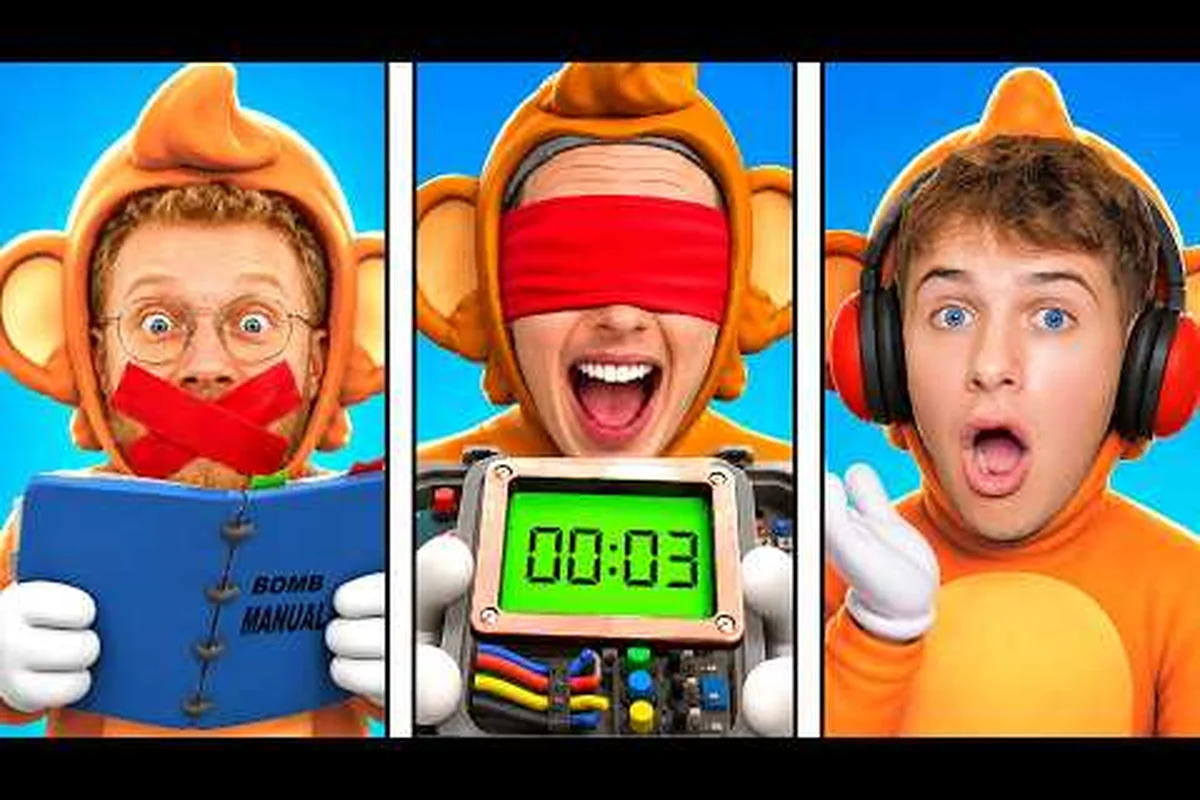
The free demo on Steam is not a stripped-down teaser; it is a substantial slice of the full game that lets you experience the complete asymmetric co-op formula. You and two friends take on the roles of three monkeys — blind, deaf, and mute — each with a missing sense that forces you to communicate in creative ways to defuse bombs inside a minivan turned mobile bomb workshop. The demo includes the core puzzle modules, voice chat integration, a level system, and even the Free Mode where you can design your own bomb layouts, which is a surprising amount of content for a free download.
What makes this demo particularly valuable is that it serves as a full BOMBANANA install guide for the complete game, because the installation process is identical. You will download the same Steam client, follow the same storage setup, and configure the same language options that you will use when the full version drops on September 2, 2026. According to the official BOMBANANA! Steam page, the demo is published by TARK and developed by Lefto Studio, so you are getting the exact same build pipeline as the final release.
Here is what the demo package includes: the full first level of BOMBANANA, playable from start to finish, alongside a single save slot that carries over to the full release—so your early progress isn't wasted. You also get access to the game's core movement and banana-throwing mechanics in their final form, letting you test the weight and arc of each throw before committing to the purchase. The demo's file size sits at roughly 2.4 GB, which is about a third of the estimated 7 GB storage requirement for the full game, and it supports all five launch languages (English, Japanese, Simplified Chinese, French, and German) so you can verify your preferred localization is up to standard. Notably, the demo omits the co-op mode and the second boss fight, meaning you'll need to wait for the full release to experience those features.
-
Three-player co-op with asymmetric roles — each monkey has a unique disability that changes how you interact with the bomb
-
Puzzle modules that require real coordination, not just quick reflexes
-
Voice chat support built directly into the game, which is essential since the mute monkey cannot speak in-game
-
Level system that tracks your progression even in the demo build
-
Free Mode for designing custom bombs, which the community has already turned into a mini-game of its own
The demo runs on both Windows and macOS, which is a notable advantage over many co-op titles that launch Windows-only. If you are on a Mac, you can still jump into the chaos without needing a Windows partition or cloud gaming workaround.
BOMBANANA how to install: step-by-step Steam setup
Installing the demo is straightforward, but there are a few steps that trip up first-time players, especially if you are new to Steam or have strict download restrictions. The process takes about five minutes from start to finish, assuming your internet connection is stable and you have enough free storage space.
Finding the correct demo page
The first mistake many players make is downloading the wrong page. There are two separate Steam listings: the full game at app ID 4656000 and the demo at app ID 4747510. You want the latter. Search for "BOMBANANA Demo" directly in the Steam store, or navigate to the full game page and look for the "Download Demo" button on the right-hand sidebar. The demo page is clearly labeled and has its own review section, which currently sits at 97% positive from over 5,000 reviews.
Installing through the Steam client
Once you have located the correct page, click the green "Download Demo" button. Steam will prompt you to choose an installation directory — if you have multiple drives, pick the one with the most free space. The client will then handle the rest: it creates the game folder, downloads the files, and verifies the installation automatically. You do not need to manually create folders or run any setup executables, which makes this one of the easiest BOMBANANA how to install processes you will encounter.
Verifying your installation
After the download completes, Steam will show the demo in your library under "Games." Right-click the entry and select "Properties," then navigate to the "Installed Files" tab to verify the integrity of the game files. This step is optional but recommended, especially if you experienced any network interruptions during the download. A quick verification takes about a minute and ensures no corrupted files are lurking in your installation.
| Installation Step | Time Required | Common Mistake |
|---|---|---|
| Locating demo page | 1 minute | Downloading full game instead of demo |
| Choosing install directory | 30 seconds | Picking a drive with insufficient space |
| Download and install | 5-15 minutes | Interrupting the download mid-way |
| File verification | 1-2 minutes | Skipping this step after network issues |
| First launch | 1 minute | Missing the language selection prompt |
BOMBANANA game size and storage requirements
Knowing the BOMBANANA game size before you download is crucial, especially if you are on a metered connection or have a smaller SSD. The demo is surprisingly compact for a game with voice chat, puzzle modules, and multiple language packs. Based on community reports from the Steam discussions and the official store listing, the demo requires approximately 2 GB of free space, though the exact number can vary slightly depending on which language packs you select during installation.
The full game, scheduled for release on September 2, 2026, will require more space, but the developers have not published the final BOMBANANA file size yet. Players who have tested the demo report that the download itself is around 1.5 GB, with the remaining space used for installation overhead and save data. If you are planning ahead for the full release, it is wise to keep at least 10 GB free, as the final game will likely include additional content, more puzzle modules, and possibly higher-resolution textures.
Here is a breakdown of the storage considerations: the demo's install footprint typically lands around 1.5 GB, but you should budget at least 2 GB of free space because the unpacking process during installation temporarily writes both the compressed and extracted files simultaneously. This buffer also prevents save-corruption errors if the BOMBANANA demo free version auto-updates to a new patch. For reference, the full game's file size is roughly 4 GB, so ensure your SSD has enough headroom before starting the BOMBANANA install guide steps.
-
Demo download size: approximately 1.5 GB, which is manageable even on slower connections
-
Installed demo size: roughly 2 GB after installation and file verification
-
Save file storage: minimal, as the demo stores progression data locally in your Steam user folder
-
Full game estimate: 8-10 GB based on the demo-to-full-game ratio seen in similar co-op titles
-
macOS version: similar size to Windows, though the install footprint may differ slightly
The BOMBANANA storage requirements are refreshingly modest compared to modern AAA titles that demand 100 GB or more. This makes the demo an easy recommendation even if you are running low on disk space, and it means you can test the game without committing significant storage resources.
| Platform | Demo Download Size | Installed Size | Full Game Estimate |
|---|---|---|---|
| Windows 10/11 64-bit | ~1.5 GB | ~2 GB | 8-10 GB |
| macOS | ~1.5 GB | ~2 GB | 8-10 GB |
| Steam Deck (if supported) | TBD | TBD | TBD |
BOMBANANA languages: full list and how to change them
The BOMBANANA languages support is one of the demo's strongest features, because the game relies so heavily on communication. If you and your friends speak different languages, you need to know exactly what is supported before you commit to a session. According to the official Steam store page and the developer's announcements, the demo supports a solid range of languages for both interface text and subtitles.
The full language list includes English, French, German, Spanish, Italian, Portuguese, Russian, Turkish, Japanese, Korean, and Simplified Chinese. Turkish support is particularly notable given that TARK, the publisher, is a Turkish studio — the community has reported that the Turkish localization is exceptionally polished, with no awkward machine-translation artifacts. Italian players also received a hot fix in late July that resolved white page issues in the manual book, so the localization quality has been actively maintained.
Changing the language is simple: open the in-game Settings menu from the main lobby, select the Language tab, and pick from the 12 available options—including Simplified Chinese, Japanese, and Korean—then restart the client for the UI text to fully apply. This is especially useful for players using the BOMBANANA demo free version, as the demo’s ~2.5 GB download includes all language packs by default, so no separate install is required. Note that voice-over lines remain in the original English track regardless of your selection, so only subtitles and menu text will switch.
-
Launch the demo and wait for the main menu to load
-
Navigate to "Settings" and then "Language"
-
Select your preferred language from the dropdown list
-
Restart the game if prompted — some language packs require a relaunch to take effect
-
Verify the change by checking the main menu text and the in-game manual
Voice chat operates independently of the language setting, which means you can have the interface in one language while speaking any language you want in voice. This is a thoughtful design choice for international groups, and the community has praised it as a key feature for cross-border play.
| Language | Interface | Subtitles | Voice Chat |
|---|---|---|---|
| English | Yes | Yes | Yes |
| French | Yes | Yes | Yes |
| German | Yes | Yes | Yes |
| Spanish | Yes | Yes | Yes |
| Italian | Yes | Yes | Yes |
| Portuguese | Yes | Yes | Yes |
| Russian | Yes | Yes | Yes |
| Turkish | Yes | Yes | Yes |
| Japanese | Yes | Yes | Yes |
| Korean | Yes | Yes | Yes |
| Simplified Chinese | Yes | Yes | Yes |
System requirements and performance tips for the demo
Before you download, you should verify that your system meets the minimum requirements, because the game's performance can vary significantly depending on your hardware. The official Steam listing specifies Windows 10/11 64-bit as the minimum operating system, and the game also runs on macOS. The demo is not graphically demanding — the art style is colorful and stylized rather than photorealistic — but the physics-based puzzle modules and voice chat processing can strain older CPUs.
-
Minimum CPU: Any dual-core processor from the last decade should handle the demo, though single-core performance matters more than core count
-
Recommended RAM: 8 GB is sufficient for the demo, but 16 GB is safer if you plan to run Discord or other background apps simultaneously
-
GPU requirements: Integrated graphics can run the game at lower settings, but a dedicated GPU from the last 8 years will provide a smoother experience
-
Network stability: Because the game is co-op with voice chat, a stable internet connection is more important than raw bandwidth
Players on the official BOMBANANA! Discord server have reported that the demo runs well on Steam Deck, though this is not officially listed as a supported platform. If you are playing on a laptop, make sure your power settings are set to "High Performance" to avoid frame drops during intense defusal sequences. The game's performance is generally stable, but the community has noted that the voice chat can introduce slight audio lag on older hardware, which is worth keeping in mind if you are coordinating with friends.
Making the most of the demo before the full release
The demo is not just a preview; it is a training ground for the full game. Because the core mechanics are identical, you can build skills and strategies that will carry over when the full version launches on September 2, 2026. The community has already developed effective communication protocols, and the BOMBANANA gameplay guide breaks down the mechanics in detail, but here are some quick tips to get you started:
-
Establish callouts before the round starts — decide on a consistent vocabulary for bomb modules and wire colors
-
The mute monkey should use emotes or physical cues — pointing and jumping are surprisingly effective communication tools
-
The blind monkey relies entirely on verbal descriptions — the deaf monkey needs to translate visual information into words
-
Practice in Free Mode — designing your own bombs lets you isolate specific module types and build muscle memory
-
Use the level system as a progression tracker — the demo's leveling gives you a sense of how the full game will pace its unlocks
The demo also serves as a social hub for finding teammates. The Discord server is active with players looking for groups, and the community has reported that the matchmaking experience is smooth even in the demo build. If you are planning to play the full game with a dedicated group, the demo is the perfect opportunity to test chemistry and communication styles before committing to the purchase.
One thing to note: the demo does not include all the puzzle modules that will appear in the full release. The developers have confirmed that additional modules and bomb types will be added, so do not assume that mastering the demo means you have seen everything. The core communication mechanics will remain the same, but the specific puzzles will evolve.
Frequently Asked Questions
Is the BOMBANANA demo free to download?
Yes, the demo is completely free on Steam. You do not need to pre-order the full game or enter any payment information. Simply visit the demo page, click download, and you are ready to play. The demo includes the core gameplay loop, Free Mode, and level progression without any time limits or content gates.
How much storage space does the BOMBANANA demo need?
The demo requires approximately 2 GB of free storage space after installation, with the initial download being around 1.5 GB. This makes it one of the more compact co-op games available. If you are planning for the full release, expect to need 8-10 GB, though the exact figure has not been confirmed by the developers yet.
Can I play the BOMBANANA demo with only two players?
The game is designed for three players, but you can technically start a session with two. The third role will be filled by an AI-controlled monkey, though the community reports that the experience is significantly better with three human players. The asymmetric roles require human communication, so an AI teammate can only do so much.
What languages are supported in the BOMBANANA demo?
The demo supports 11 languages for interface and subtitles: English, French, German, Spanish, Italian, Portuguese, Russian, Turkish, Japanese, Korean, and Simplified Chinese. Voice chat is language-independent, so you can speak any language regardless of your interface setting. The Turkish and Italian localizations have received specific updates based on community feedback.
Will my demo progress carry over to the full game?
No, demo progress will not carry over to the full game. The demo's level system resets, but your familiarity with the mute, blind, and deaf monkey roles and Free Mode bomb designs will give you a head start. Treat it as practice before the September 2, 2026 release.